
More actions
imported>talin0528 No edit summary |
imported>talin0528 No edit summary |
||
| (3 intermediate revisions by 2 users not shown) | |||
| Line 1: | Line 1: | ||
<html> | |||
<head> | |||
<title>Event Test</title> | |||
<script language='JavaScript'> | |||
var c=0; var t; var timer_is_on=0 | var c=0; var t; var timer_is_on=0 | ||
function checkContent() | function checkContent() | ||
{ | { | ||
alert("Content is changed."); | |||
} | } | ||
} | function displaymessage() | ||
{ | |||
alert("Hello World!"); | |||
} | |||
onfocus="document.bgColor='white'" onblur="document.bgColor='yellow'" | function writeText(txt) | ||
{ | |||
document.getElementById("contents").innerHTML=txt; | |||
} | |||
function timedCount() | |||
{ | |||
document.getElementById('txt').value=c; | |||
onmousedown="alert('사자자리 유성우');" onmouseup="alert('마우스 누르기 해제');" alt="마우스 누르고 때는 거 확인" | c++; | ||
if(c < 60){ | |||
width="300" height="300" usemap="#planet" onmouseout="alert('마우스 아웃');" alt="마우스 포인터 감지" | t=setTimeout("timedCount()",1000);//1초마다.. | ||
} | |||
} | |||
</script> | |||
</head> | |||
<body onload="alert('Welcome!!');" onunload="alert('Bye~');" | |||
onfocus="document.bgColor='white'" onblur="document.bgColor='yellow'"> | |||
<h2>테스트 페이지입니다.</h2> | |||
<form> | |||
<b>내 용:</b> | |||
<input type="text" size="30" id="email" onchange="checkContent()" alt="내용 변화 감지"><br> | |||
<input type="button" value="메세지 출력" onclick="displaymessage()"><br> | |||
<img src="http://static.naver.com/ncc/2010/07/30/163114192381349.jpg" | |||
onmousedown="alert('사자자리 유성우');" onmouseup="alert('마우스 누르기 해제');" alt="마우스 누르고 때는 거 확인"> | |||
<img src="http://static.naver.com/ncc/2010/07/30/1631301773960435.jpg" | |||
width="300" height="300" usemap="#planet" onmouseout="alert('마우스 아웃');" alt="마우스 포인터 감지"> | |||
<map name="planet"> | |||
<area shape="circle" coords="150,150,20" | |||
onmouseover="writeText('쌍둥이자리 유성우의 원 부분에 닿았습니다.');" | |||
href="http://sstatic.naver.com/ncr/Recipe/1/20100413204704092_X0KZLRZZ1.jpg"> | |||
<p id="contents"></p> | |||
<input type="text" id="txt"><input type="button" value="초시계" onClick="timedCount()"> | |||
</form> | |||
</body> | |||
</html> | |||
= 증거물 찾기 = | |||
image map은 역전재판에서 열심히 증거물을 수집하려고 배경을 여기 저기 눌러 볼 때에 적당한 거 같다 'ㅁ' | |||
원래는 증거물 박스 클릭하는 거로 하려했는데 | |||
....... 차라리 css로 좀 더 세부적으로 분류한 다음에 사용하는게 나을듯?? | |||
<html> | |||
<head> | |||
<script type="text/javascript"> | |||
function writeText(txt) | |||
{ | |||
document.getElementById("desc").innerHTML=txt; | |||
} | |||
</script> | |||
</head> | |||
<body> | |||
<img src ="http://www.court-records.net/places/DS/berryoffice.png" width ="480" height ="300" | |||
usemap="#evidence" /> | |||
<map name="evidence"> | |||
<area shape ="rect" coords ="151,175,321,224" | |||
onClick="writeText('서재다. 아무것도 없다.')" /> | |||
<!-- rect는 x1,y1(왼쪽위),x2,y2(오른쪽아래)의 좌표를 지정한 직사각형--> | |||
<area shape ="rect" coords ="54,78,130,208" | |||
onClick="writeText('트로피가 보인다.')" /> | |||
<area shape ="poly" coords ="92,239,139,232,164,257,109,268" | |||
onClick="writeText('서류가 보인다.')"/> | |||
<!-- poly는 x1,y1,x2,y2,x3,y3....의 식으로 시계방향으로 좌표 지정 가능 다각형--> | |||
<area shape ="rect" coords ="240,75,320,170" | |||
onClick="writeText('서커스 포스터다.')" /> | |||
<area shape ="poly" coords | |||
="345,112,357,112,375,126,375,174,360,211,336,211,330,175,321,175,322,125,341,122" | |||
onClick="writeText('서커스 단장의 옷으로 보인다.')" /> | |||
</map> | |||
<p id="desc"></p> | |||
</body> | |||
</html> | |||
---- | |||
* 앗! 연습 페이지를 만들었네~ 다른 팀원들도 연습 페이지 만들어서 소스 올리면 서로 뭐 했나 구경도 하고 기록도 남고 좋을 것 같다ㅎㅎ - [[김수경]] | |||
---- | |||
[[2010JavaScript]] | |||
Latest revision as of 07:54, 22 August 2010
<html>
<head>
<title>Event Test</title>
<script language='JavaScript'>
var c=0; var t; var timer_is_on=0
function checkContent()
{
 alert("Content is changed.");
}
function displaymessage()
{
 alert("Hello World!");
}
function writeText(txt)
{
 document.getElementById("contents").innerHTML=txt;
}
function timedCount()
{
 document.getElementById('txt').value=c;
 c++;
 if(c < 60){
 t=setTimeout("timedCount()",1000);//1초마다..
 }
}
</script>
</head>
<body onload="alert('Welcome!!');" onunload="alert('Bye~');"
onfocus="document.bgColor='white'" onblur="document.bgColor='yellow'">
<h2>테스트 페이지입니다.</h2>
<form>
<b>내     용:</b>
<input type="text" size="30" id="email" onchange="checkContent()" alt="내용 변화 감지"><br>
<input type="button" value="메세지 출력" onclick="displaymessage()"><br>
<img src="http://static.naver.com/ncc/2010/07/30/163114192381349.jpg"
onmousedown="alert('사자자리 유성우');" onmouseup="alert('마우스 누르기 해제');" alt="마우스 누르고 때는 거 확인">
<img src="http://static.naver.com/ncc/2010/07/30/1631301773960435.jpg"
width="300" height="300" usemap="#planet" onmouseout="alert('마우스 아웃');" alt="마우스 포인터 감지">

<map name="planet">
<area shape="circle" coords="150,150,20"
onmouseover="writeText('쌍둥이자리 유성우의 원 부분에 닿았습니다.');"

href="http://sstatic.naver.com/ncr/Recipe/1/20100413204704092_X0KZLRZZ1.jpg">
<p id="contents"></p>
<input type="text" id="txt"><input type="button" value="초시계" onClick="timedCount()">
</form>
</body>
</html>


증거물 찾기
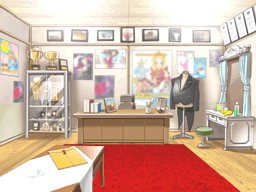
image map은 역전재판에서 열심히 증거물을 수집하려고 배경을 여기 저기 눌러 볼 때에 적당한 거 같다 'ㅁ' 원래는 증거물 박스 클릭하는 거로 하려했는데
        ....... 차라리 css로 좀 더 세부적으로 분류한 다음에 사용하는게 나을듯??
<html>
<head>
<script type="text/javascript">
function writeText(txt)
{
document.getElementById("desc").innerHTML=txt;
}
</script>
</head>

<body>
<img src ="http://www.court-records.net/places/DS/berryoffice.png" width ="480" height ="300"

usemap="#evidence" />
<map name="evidence">

<area shape ="rect" coords ="151,175,321,224"
onClick="writeText('서재다. 아무것도 없다.')" />
<!-- rect는 x1,y1(왼쪽위),x2,y2(오른쪽아래)의 좌표를 지정한 직사각형-->

<area shape ="rect" coords ="54,78,130,208"
onClick="writeText('트로피가 보인다.')" />

<area shape ="poly" coords ="92,239,139,232,164,257,109,268"
onClick="writeText('서류가 보인다.')"/>
<!-- poly는 x1,y1,x2,y2,x3,y3....의 식으로 시계방향으로 좌표 지정 가능 다각형-->


<area shape ="rect" coords ="240,75,320,170"
onClick="writeText('서커스 포스터다.')" />

<area shape ="poly" coords

="345,112,357,112,375,126,375,174,360,211,336,211,330,175,321,175,322,125,341,122"
onClick="writeText('서커스 단장의 옷으로 보인다.')" />

</map>
<p id="desc"></p>

</body>
</html>
- 앗! 연습 페이지를 만들었네~ 다른 팀원들도 연습 페이지 만들어서 소스 올리면 서로 뭐 했나 구경도 하고 기록도 남고 좋을 것 같다ㅎㅎ - 김수경